Paper Permits vs Digital: What Changes When You Switch
What changes when you move permit to work from paper to digital, and what should stay with people.
 Mitchell BourneManaging Director
 - Published
- 10 min read
Paper permits fail in the gaps between people. A digital system closes those gaps without taking judgement out of anyone's hands. This guide is for the safety or facilities manager who owns the permit procedure, in a property and facilities management portfolio, a transport and logistics depot or any site that runs hot work, isolations and confined space jobs. The worked examples are illustrative, not real customers. A one-page version is the permit-design checklist (PDF).
Where Does a Paper Permit to Work Fail?
In five places, and the worst failure is a paper permit that looks complete. The textbook case is Piper Alpha, the North Sea platform lost in 1988. A condensate pump had two permits suspended at once, one for work on its motor coupling and one for removal of a pressure relief valve. They were kept in the safety office, not the control room, and filed by trade and not by location, so the night shift, it is believed, tried to restart the pump without knowing the valve was gone.1 As the Commons was told in March 1991, the Cullen inquiry found the permit system had failed, with shift handover a major factor.2 In all, 167 men died.1
Copies get lost. A carbon pad leaves one copy with the issuer, one with the crew and one in the book. Asked for every hot work permit in one workshop over 12 months, someone drives to three depots to find pads.
Sections go unsigned. Paper accepts a blank box. The permit looks valid because it is signed at the bottom; the gap is found after an incident.
Nobody can see what is open. 'Which permits are open across the network right now' is answered by phone calls and memory.
Isolations are not cross-checked. Piper Alpha again: two permits touching one machine and no single place where both appear.
Handover loses the thread. Safe Work Australia's confined spaces Code says an entry permit must be re-validated when the person directing the work changes, the work stops and restarts, the work changes in a way that brings new hazards, or new controls are needed.3 On paper that is a signature on the back, remembered or not, and a change of shift is when it is forgotten.
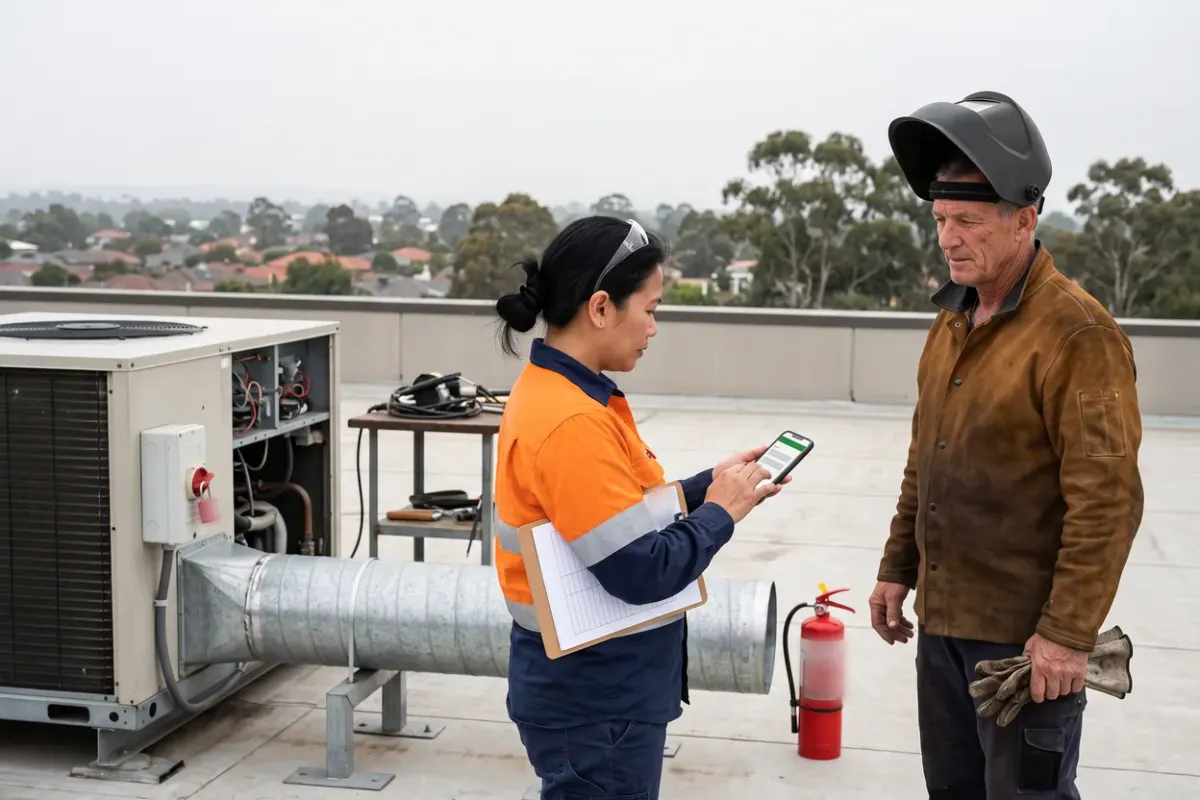
Picture a regional distribution depot. A contractor is welding a bracket on a trailer chassis in the workshop, which needs a hot work permit. The same morning the oil separator pit by the wash bay is being cleaned, which needs an entry permit, and an electrician is isolating the compressor that serves both. The depot manager signs the entry permit, the electrician records the isolation in their own book, and the workshop supervisor fills in the hot work. Each is correct. Nobody holds all three, and the next shift sees only one.
What Does a Digital Permit System Have to Do?
Judge a system by what it refuses to let happen. Seven tests, each a thing paper cannot enforce:
- It refuses an incomplete permit. Required questions must be answered before it can be submitted.
- It sends each section to its own reviewer and records who approved what, and when.
- It shows every open permit, by site and location, as things stand now.
- It expires at an hour and says so. An expired permit cannot be signed in to.
- It links permits that touch the same plant, so the isolation and the hot work appear together.
- It puts the crew on the permit: who signed in, who signed out and who confirmed it. Safe Work Australia's Code expects a way to show who is in a confined space while the permit is valid, such as signing in and out on it.3
- It keeps answers, attachments, approvals and sign-ins together, so the record can be found. For an entry permit that is a duty under the model WHS Regulations: a copy must be kept at least until the work is complete, and at least 2 years after a notifiable incident connected with the work (regulation 77).4
Ask any vendor to show all seven on a phone, with no signal.
Approve Each Section by the Person Who Can Judge It.
A paper permit has one approval box, so one person approves everything, usually whoever is nearest the pad. Whether they can judge the isolation, the method statement and the fire precautions at once is luck. A digital permit can be cut into sections, each with its own reviewer.
In the depot example, the method statement goes to a safety adviser who can read it. The isolation goes to the electrician or area supervisor who will lock and tag it. The hot work conditions, meaning the area cleared, the extinguisher in place and a named fire watch, go to the issuer in the workshop. The final authorisation goes to the depot manager, once the other sections have cleared.
Name a backup for every reviewer, because a section waiting on someone on leave stops the work, and show the authoriser every section's status. Roof access across a property portfolio splits the same way, in the permits section of WHS procedures: 10 examples and how to make each one run.
Link the SWMS & the Worker's Competency to the Permit.
A permit says the job may start. A safe work method statement (SWMS) says how it will be done. A licence or training record says who can do it. On paper those are three documents in three places, reconciled by eye. Three links make it a check.
First, the SWMS travels on the permit, attached by version, so what was approved is what was read, not whatever is in the contractor's ute. Second, workers are named on the permit, not counted as 'crew of four'. Third, each permit type lists the competencies it needs, such as a high risk work licence for the equipment or an electrical licence for the isolation, checked against the worker's record at issue and again at sign-in.
Ask any vendor to show a permit refused because a licence has expired. If it cannot, the link is a filing cabinet, not a check. The permit should read the worker's record in workforce compliance.
What Should You Automate, & What Must a Person Sign?
Automate the movement and checking of information. Keep people on anything physical.
| Automate | Keep with a person |
|---|---|
| Required answers, reminders, routing to the right reviewer | The decision to authorise the work |
| Expiry at the hour, and an alert when a permit runs over | The physical isolation, lock and tag, proved dead |
| Flagging two permits on the same plant | The gas test or hot work area check, made at the place |
| Checking the SWMS against your criteria for missing sections | Declaring a worker competent for this job |
| Sign-in, sign-out, the live list and the record | The fire watch, the check after hot work and the close-out walk |
A form can confirm that someone ticked 'area checked for combustibles'. It cannot confirm the area was checked. In the depot example the pit is a confined space. The model Regulations require a standby person in the vicinity of the space to monitor conditions (regulation 69).4 A system can require the test result, name that person and hold the permit until each is complete. It cannot stand at the pit mouth, and no field replaces them.
Regulation 67 of the model WHS Regulations requires a person conducting a business or undertaking to issue a confined space entry permit before directing a worker to enter a confined space to carry out work, completed by a competent person and in writing.4 Every state and territory except Victoria has adopted the model laws, some with variations, and Victoria's own regulations sit outside this post.5 The Regulation and the Code both say 'in writing', neither says the permit must be on paper, and the Code does not mention electronic permits.34
Where AI Reads the SWMS, & Who Stays Accountable.
AI helps most at the step paper leaves to a tired person: reading a method statement against a standard. An AI agent can do the first read, checking a SWMS against criteria you set, such as scope, hazards, controls and emergency arrangements, and saying what is missing. It should never approve the permit, waive a failed criterion or declare a worker competent.
Who runs it matters. In ComplyFlow the person filling in the form, such as the contractor, runs AI SWMS review on the question holding the method statement and sees each criterion marked Pass, Partial or Fail with feedback.6 They get 3 reviews per question per permit, so they can fix the SWMS and run it again. The review is optional, the form can be submitted without it or despite low scores, and reviews are logged and visible to staff.6 It reviews a method statement; it does not write one.
So an approver does not always receive the gaps. Write the rule into your procedure: a permit arrives with an AI review attached and every failed criterion answered, or it goes back. The approver's name goes on the permit, so the approver reads the SWMS and not only the marks. For the first month, read one SWMS in ten in full and compare it with the AI's marks, because the AI reads text and cannot see the plant. The Help Centre's own guide says 'AI provides guidance, but you're responsible for accuracy.'6
How Do You Switch From Paper to Digital Permits?
Switching permits differs from switching a spreadsheet in one important way: you cannot run old and new side by side for the same job. Two live permits for one task is two versions of authority, and the crew will follow whichever is nearer. Run them in parallel by permit type and site, never by job.
Weeks 1 and 2: baseline and design. Pull 20 closed paper permits at random and count blank sections and missing close-outs. Time five from request to approval. Fix the form before you copy it: drop questions nobody reads, add the ones you wish had been asked, and name a reviewer and backup per section.
Weeks 3 to 5: dry run, then pilot. Walk a past hot work job through the system with the real reviewers, each on their own phone. Then pilot one site and one permit type with steady volume and moderate risk, such as an access permit in property and facilities management or workshop hot work in transport and logistics, not the rarest and riskiest. From the start date the digital permit is the permit. Paper stays only as a numbered downtime pad, logged and reconciled afterwards.
Week 6: review and widen. Read the pilot's numbers, add a second permit type, then a second site, and retire the pads site by site. Set the end condition in advance: a date, and a state such as two weeks with every permit raised digitally.
In ComplyFlow each section of a permit has its own reviewer, set by role, team or the permit holder.7 A reviewer can approve, ask for more information, hold or cancel,8 or open Permits Awaiting Approval in the Live Access app, view the files and approve or reject with a comment.9 Once a permit is approved, workers sign in from their Live Access dashboard, and the area supervisor sees how many are signed in and confirms each sign-out.10 The digital permits page lists the rest.
Which Numbers Show the Switch Worked?
Take six numbers from the paper system first. We found no credible Australian benchmark for any of them, and the vendor pages we read quote percentages with no source or date, so set targets from your own baseline.
- Complete at first submission: the share of permits with every required section answered when first sent.
- Request to approval time: the median, by permit type.
- Open past expiry: permits still open after their end time. The target is zero.
- Time to list every open permit at a site: in minutes.
- Closed the same shift: the share closed in the shift the work ended.
- Overlaps caught before work: two permits on one plant flagged at issue, against found afterwards.
Add one for leakage: paper permits used outside downtime.
A Permit-Design Checklist for Your Next Review.
The permit-design checklist (PDF) puts the seven tests, the reviewer map, the automate-or-sign split, the limits on AI and the six numbers on one page, for a vendor demo or your own procedure review.
The payoff comes on an ordinary morning, when the supervisor taking over a shift opens one list and sees every open permit on the site, the reviewer of each section and the crew under it, before anyone picks up a torch. To test your own permit types, book a demo and bring one. The safety manager's view shows the rest.
Sources
- Piper Alpha: the disaster in detail
- Piper Alpha (Cullen Report), Commons debate
- Confined spaces: Code of Practice
- Model Work Health and Safety Regulations, regulation 67
- Model WHS laws: adopted in every jurisdiction except Victoria
- Quick Start Guide: How Users Experience AI Review
- Permits: Concepts, Workflow & Examples
- Reviewing a Form
- Approving Permits via Live Access
- Area Supervisor Checking Sign In and Out in Permit
See It Against Your Own Contractors, Sites & Rules.
Book a 30-minute demo. We will show ComplyFlow working with your kind of sites, your kind of contractors, and your requirements. No slides, no hard sell.
Or Speak to Us
- ISO 27001
- Hosted on AWS
- Microsoft & Okta SSO
- API & MCP
- Data in Australia
Written by
Mitchell BourneManaging Director, ComplyFlow
Mitchell has run ComplyFlow since 2009 and has spent that time inside the contractor, site, and safety problems of Australian operators. He writes about where compliance actually fails, and what the people responsible for it can do about it.
Writes about: Contractor compliance, WHS duty and proof, Running a compliance program
Questions
Questions People Ask About This.
Does the law say a permit to work has to be on paper?
Not in anything we read. Regulation 67 of the model WHS Regulations requires a confined space entry permit to be completed by a competent person and to be in writing, and Safe Work Australia's confined spaces Code repeats 'in writing'. Neither says the permit must be on paper, and the Code does not mention electronic permits. Every state and territory except Victoria has adopted the model laws, some with variations, and Victoria's own regulations, each state's rules on electronic records and any contract or insurer's terms sit outside this answer, so ask your regulator if one depends on it.
Can AI approve a permit to work?
No. The approver decides, and their name goes on the permit. In ComplyFlow the AI only marks each criterion of a method statement Pass, Partial or Fail; the person filling in the form runs that review, it is optional, and the Help Centre's own guide says the user is responsible for accuracy. Your procedure sets what must arrive with the permit.
How long does it take to move permits off paper?
Plan on about 6 weeks to get one permit type live at one site: 2 weeks to baseline and design, 1 to dry-run, 2 to pilot and 1 to review. That is our planning assumption, not a measured average. Adding sites and permit types takes longer.
What should stay on paper?
A numbered downtime pad for when the phone, the network or the system fails. Log every sheet issued and key it into the system afterwards. Paper is the fallback, never a second way of working, or you have two versions of authority again.
How do you cost paper against digital permits?
Count your own hours: time chasing signatures and copies, time finding permits for an audit, printing and storage, and the cost of a permit found open after the work ended. No credible Australian benchmark is available to cite, and the vendor pages we read quote percentages with no source or date.