Best Free Inspection Apps for Small Teams (2026)
Six of the ten inspection apps here are free to keep, not free to try: ComplyFlow, Mitti (formerly SafetyCulture), Safesite, MaintainX, Fiix, and Safety Reports. Which one suits a small team comes down to three caps: how many users the free plan allows, whether it works with no signal, and whether an inspection can attach to an item of plant. Every plan below was read off the vendor's own pages on 15 September 2026.
 Mitchell BourneManaging Director
 - Published
- Updated
- 13 min read
Six of the ten inspection apps here are free to keep, not free to try: ComplyFlow, Mitti (formerly SafetyCulture), Safesite, MaintainX, Fiix, and Safety Reports. Which one suits a small team comes down to three caps: how many users the free plan allows, whether it works with no signal, and whether an inspection can attach to an item of plant.
ComplyFlow is our own product, and it sits in the table on the same terms as the other nine. Every plan below was read off the vendor's own pages on 15 September 2026.
What Changed This Year.
Three things, and all three change the answer.
SafetyCulture is now Mitti. The rebrand landed on 11 August 2026 and safetyculture.com redirects to mitti.com. The product is the same and the template library is now 59,216, against 500 published by Safesite and no number at all from the other eight.
Three vendors stopped publishing prices. Limble, Lumiform, and Fracttal show tiers with no figures and a quote form. On Limble's pricing page the words free, trial, and the dollar sign appear nowhere at all. That is harder to work around than a small free tier, because you cannot compare what you cannot see.
Offline turns out to be the expensive bit, and the murkiest. Limble puts offline mode behind an upgrade from its entry plan. MaintainX's own pricing page marks offline as a Premium feature while its own help centre says it is on all four plans, and we cannot reconcile those. Fiix documents offline mode thoroughly and never says which plan it needs. If the reason you are reading this is a basement, a tank farm, or a paddock, read that column before any other.
Quick Comparison Table.
Every figure is from the vendor's own pages on 15 September 2026. Where a currency is not named by the vendor, it is not named here either.
| Product | Free plan | What the free plan caps | Offline | Inspection attaches to an asset |
|---|---|---|---|---|
| ComplyFlow | Yes | Not published; a free Starter account, then a conversation | Yes, mobile app | Yes, full plant and vehicles module, QR-linked |
| Mitti | Yes | 10 users, 5 active templates, unlimited inspections, 5 GB shared storage, 30 days of data | Mobile app only; excludes the template editor, analytics, and library | Yes, asset register |
| Safesite | Yes | Unlimited members and guests; reporting restricted to the last 30 days | Yes, on the free plan, across all core features | Yes, a dedicated profile per item with service history |
| MaintainX | Yes, 'free forever' | 2 work orders with attached procedures a month, 2 active repeating work orders, 1 month of advanced analytics | Mobile only, work orders only, cached; their own two pages disagree on the plan | Yes, unlimited assets and hierarchies, every tier |
| Fiix | Yes, 'no trials, no end date' | 25 active preventive maintenance tasks; no pass or fail inspection tasks; user count not published | Mobile app, 'most features'; plan not stated | Yes, unlimited assets, every tier |
| Safety Reports | Yes, in its help centre | 2 checklists, 2 inspections a month, 50 checklist items per inspection | complete offline capability, mobile apps | Scan module, Premium plan only |
| Formitize | No, 14-day trial | No user, site, template, or storage caps published | Forms capture yes; workflows online only | Paid add-on, from AU$19.99 a month |
| Limble | No | No price published on any tier | Not on the entry plan; an upgrade | Yes, unlimited assets and hierarchies |
| Lumiform | No plan on its pricing page | No price published; quote only | Yes, sync on reconnect | Yes, via Entities |
| Fracttal | No | No plan names, no prices, no trial published | Mobile app, once synced | Yes, assets are the centre of the product |
Every product here has native iOS and Android apps and a web dashboard, ComplyFlow included: both the Inspection and Live Access apps are listed on the App Store and on Google Play.
The Ten, and What Each Plan Actually Costs You.
1. ComplyFlow.
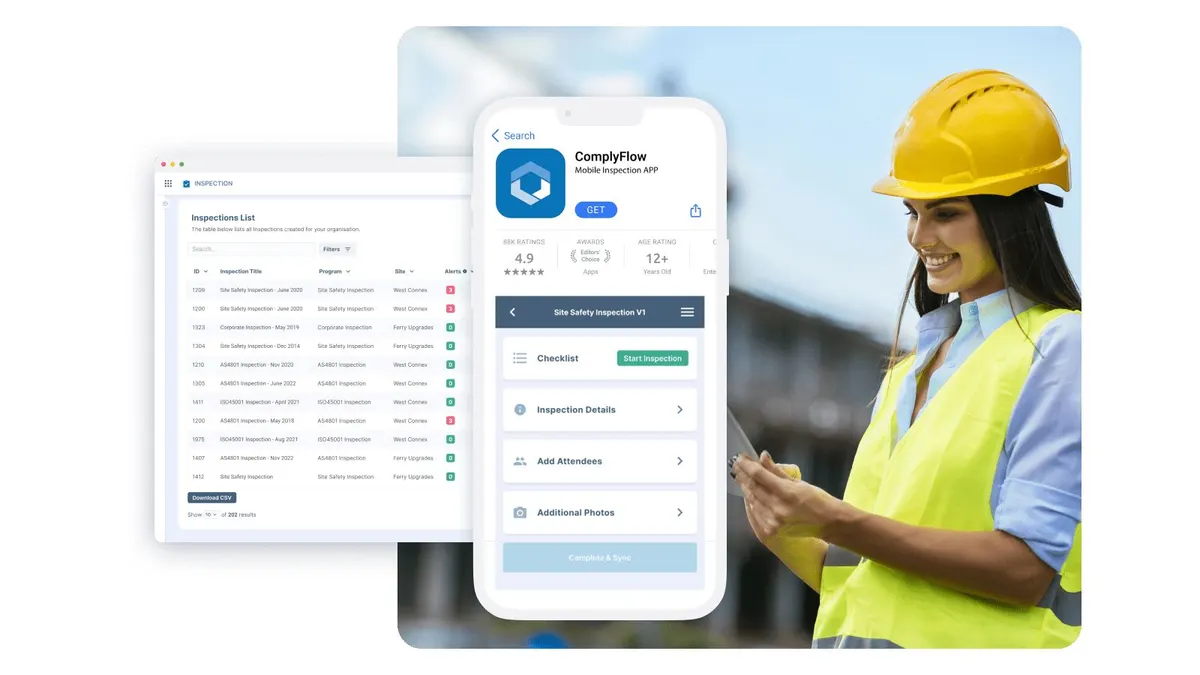
Purpose-built for operational safety and compliance inspections, with a web portal and native mobile apps for frontline use. Offline inspections with automatic sync, configurable templates and custom fields, scheduled inspection programs, and corrective actions in the same workflow. An inspection attaches to a specific item of plant, which carries its own documents, categories, expiry dates, and inspection history.
Free plan: a free Starter account, no credit card. ComplyFlow publishes no plan caps or seat price; what a Client pays for the platform is a conversation.
Plan limitations, in our own words: ComplyFlow publishes no plan table, so its caps cannot be compared against the rest of this list from a page. Worker licences are AU$35 a year* and an AI-reviewed prequalification is AU$100 a year, so if inspections are genuinely all you need, you are buying into a broader compliance platform rather than a checklist tool. Offline is in the mobile Inspection app, not the web dashboard, which is the same limitation most of this list has.
Best for: a team that has to produce WHS evidence and wants inspections on the same record as the contractor, the induction, and the incident. See Inspections and Audits.
2. Mitti, formerly SafetyCulture.
The most mature mobile inspection product here, with by far the largest template library: 59,216 templates, 912 courses, and 34 collections on its own library page. Offline capture, scheduling, and analytics, and the most generous free user count of the six free plans.
Free plan: nil, up to 10 users, 5 active templates, unlimited inspections, 5 GB shared storage, and 30 days of data across 3 dashboards. Premium is US$24 per seat per month billed annually, or US$29 monthly. Any plan can be trialled for 30 days.
Plan limitations, from its own pages: the free plan holds only 30 days of data, which will not answer anyone asking what you inspected last quarter. Offline is mobile-only and excludes the template editor, analytics, and the library. A user may be signed in on up to three mobile devices at once, on every plan, which catches teams sharing a tablet. And the price is published in US dollars while its FAQ says Australian customers are billed in Australian dollars at a figure it does not publish.
Best for: teams that want the biggest template library and the most proven mobile experience, and can live with a 30-day data window while on the free plan.
3. Lumiform.
A clean web platform with native apps and a no-code form builder, more than 12,000 starter checklists, and offline sync on reconnect. Findings convert into tasks and corrective actions.
Free plan: none on its pricing page as at 15 September 2026. The page shows two cards, Professional and Enterprise, both 'request a quote', and its own FAQ confirms those two.
Plan limitations, from its own pages: no published price on either tier, and no stated trial length. Its billing currencies are euro, pound sterling, and US dollar, with no Australian dollar option. One oddity we will not resolve on their behalf: the pricing page's meta description still advertises a free-forever plan and a €16 per user per month Professional plan that the page itself no longer shows, and the help centre still references free-plan support. The pricing page is the authority here, but ask them.
Best for: teams that want a large pre-built template library and are prepared to have a sales conversation to find out what it costs.
4. Safesite.
A safety-first inspection and hazard platform, with toolbox talks, hazard management, and safety scoring alongside inspections. Its offline story is the clearest of the ten and it is on the free plan, which no other vendor here can say as plainly.
Free plan: nil, with unlimited members and guests, including offline mode and the equipment register. Premium is 16 per member per month on annual billing, or 20 billed monthly, with a 30-day trial on Premium. Safesite names no currency anywhere on its site, so neither do we. Over 500 templates and forms. Currency not named anywhere on its site.
Plan limitations, from its own pages: reporting on the free plan is restricted to the last 30 days, which is the trade for unlimited people. Offline covers all core features but not signing in, exporting a PDF, or any library template you have not already downloaded, so pull a new template down before you lose signal. The 30-day trial is on Premium, not a second free option.
Best for: a crew of any size where everybody needs an account, the work happens without signal, and nobody needs reporting further back than a month.
5. MaintainX.
A maintenance and operations platform whose free tier includes checklists and inspection workflows, strongest where inspections tie to equipment and recurring maintenance. Unlimited assets and locations with hierarchies on every tier, including free.
Free plan: Basic, described as free forever. Essential is 20 per user per month billed annually or 25 monthly; Premium is 65 or 75; Enterprise is custom. Currency not named anywhere, including in its terms of service.
Plan limitations, from its own pages: the free plan allows 2 work orders with attached procedures a month, 2 active repeating work orders, and one month of access to advanced analytics. Those caps make free a trial in practice. Offline is mobile-only, covers work orders only, works from a capped cache you must build while online, and is not available to requester accounts at all.
And a conflict worth knowing before you commit. MaintainX's own pricing page marks offline mode as a Premium feature, absent on Basic and Essential. Its own help centre lists offline mode as available on Basic, Essential, Premium, and Enterprise. Those cannot both be right and we are not going to pick one for them. If offline matters to you, get MaintainX to confirm in writing which plan you need.
Best for: facilities and manufacturing teams that want inspection tied to equipment maintenance, with the offline question settled in writing first.
6. Fiix CMMS.
A maintenance system from Rockwell Automation with an open-ended free plan and thorough mobile offline documentation. Unlimited assets with hierarchies on every tier.
Free plan: nil, in Fiix's own words 'no trials, no end date'. It allows 25 active preventive maintenance tasks and 'limited users', a number it does not publish.
Plan limitations, and read this one before choosing Fiix for inspections: pass and fail inspection tasks are not on the free plan. They are a Basic plan feature, at US$45 per user per month. So the free tier gives you an asset register, work orders, and preventive maintenance, but not the thing this article is about. Reporting is also on Basic; Professional at US$75 adds custom analytics and reports. Fiix does not state which plan offline mode requires, anywhere. Its mobile offline mode covers 'most features', not all, and there is a real trap in its own documentation: if you sign out before the app syncs, or leave it idle for 30 days, offline changes are lost.
On currency, Fiix is the honest one. Its pricing page names no currency, but its help centre says plainly that it supports US dollars only, with no Australian dollar option. Worth knowing before a Sydney reader assumes US$45 is what lands on the card.
Best for: asset-heavy organisations that want inspections inside broader maintenance management and are willing to start at the Basic plan.
7. Limble CMMS.
A well-regarded maintenance platform with unlimited assets and asset hierarchies on its entry tier, native apps, and QR-driven task initiation.
Free plan: none. Three tiers, Standard, Premium+, and Enterprise, with a 'calculate my price' link.
Plan limitations, from its own pricing page: no price is published on any tier, and the words free, trial, and the dollar sign appear nowhere on the pricing page or the homepage. More importantly here, offline mode is not included on Standard: its own comparison marks it absent there, and its page describes Premium+ as Standard plus offline mode. An inspection tool that charges extra to work without signal is a specific thing to establish before a demo, not after.
Best for: maintenance teams with a budget conversation already underway, working somewhere with reliable connectivity or willing to pay for the upgrade.
8. Fracttal One.
A cloud maintenance system where assets are the centre of the product, with mobile offline capture after sync and IoT integration for predictive maintenance.
Free plan: none published, and this is the flattest finding of the ten. There are no plan names, no prices, no free tier, and no trial anywhere on Fracttal's own site in English or Spanish. Its /prices, /pricing, and /plans paths all serve the same quote form, and its own FAQ links to a plans page that is that form.
Plan limitations, from its own site: you cannot establish any of them without contacting sales. Offline works on the mobile app once it has synced.
Best for: organisations that want IoT-integrated maintenance and are comfortable starting with a sales conversation rather than a trial.
9. Formitize.
A forms and inspection platform strong on highly customised reporting, popular in building inspection, pest control, fire, and service businesses.
Free plan: none. A 14-day free trial with no card required, then AU$29.99 a month per user. Formitize is the only vendor of the ten that ties its price to Australia: its page states that all prices exclude GST for Australian businesses.
Plan limitations, from its own pricing page: assets are a paid add-on rather than part of the plan, at AU$19.99 a month for business customers and from AU$250 a month for enterprise, so attaching an inspection to a piece of plant costs extra. Offline captures forms but workflows only run online, which is a real limit if your process depends on routing. No user, site, template, or storage caps are published at all, which cuts both ways.
Best for: pest control, building inspection, and service businesses that need heavily customised reports and want an Australian price in writing.
10. Safety Reports, by AlignOps.
Standards-driven inspection checklists with web reporting and mobile apps, well known in construction safety for tying findings to follow-ups.
Free plan: yes, though not on the pricing page. Its help centre documents a free account limited to two checklists, two inspections a month, and 50 checklist items per inspection. Its app registration page also advertises a 14-day free trial across five apps. The pricing page shows only Pro and Premium, both 'contact us for pricing'.
Plan limitations, from its own pages: two inspections a month is the tightest free cap here by a wide margin, and 50 checklist items will not hold a long plant inspection. Asset handling is in the Scan module, on Premium only. Neither paid tier publishes a price in any currency. Its checklists are built on United States occupational safety standards rather than Australian WHS regulations, which matters if the evidence has to line up with what a local regulator expects.
Best for: construction safety teams working to United States standards who want a defensible record and a free account to test it with.
How These Ten Were Chosen, and How They Were Checked.
Every product had to have native iOS and Android apps, a web dashboard, offline inspection capability, a free plan or a trial, and core inspection features: customisable templates, scheduled inspections, and corrective actions.
What changed in this edition, and why. An earlier version carried a 'known limitations' list under each competitor, built from paraphrased user reviews. That is gone, for three reasons. Capterra's content policy does not permit paraphrasing its reviews or quoting reviews about another provider, and G2 prohibits republishing another vendor's reviews. An anonymous review substantiates nothing under Australian Consumer Law, so it was never evidence for the claims it was carrying. And it produced an obvious asymmetry, where nine competitors had a list of faults and our own product had none.
Every limitation above is now read off the vendor's own published plan, and ComplyFlow carries one too.
A word on what a gap means here. Where this guide says a vendor does not publish something, that is exactly what it means: we could not find it on their own live pages on 15 September 2026. It does not mean the product cannot do it, and several of these sites build parts of their pricing pages with scripts that may not have rendered for us. Where a vendor's own two pages disagree, as MaintainX's do about offline mode, we have said so rather than picking the one that suited the argument. Plans change. Check with the vendor before you buy, and tell us if we have something wrong and we will fix it.
Try ComplyFlow free
A free Starter account: offline inspections, configurable templates, and corrective actions, with no credit card. Start a free account, or read how Inspections and Audits fits the rest of the platform.
Sources
- ComplyFlow for Contractors & Suppliers
- Mitti pricing
- Mitti template library
- Lumiform pricing
- Safesite pricing
- Safesite offline mode
- Safesite equipment management
- MaintainX pricing
- MaintainX offline mode
- Fiix pricing
- Fiix plans and payment FAQ
- Fiix offline mode in the mobile app
- Limble pricing
- Fracttal plans
- Formitize pricing
- Safety Reports pricing
- Safety Reports help centre
See It Against Your Own Contractors, Sites & Rules.
Book a 30-minute demo. We will show ComplyFlow working with your kind of sites, your kind of contractors, and your requirements. No slides, no hard sell.
Or Speak to Us
- ISO 27001
- Hosted on AWS
- Microsoft & Okta SSO
- API & MCP
- Data in Australia
Written by
Mitchell BourneManaging Director, ComplyFlow
Mitchell has run ComplyFlow since 2009 and has spent that time inside the contractor, site, and safety problems of Australian operators. He writes about where compliance actually fails, and what the people responsible for it can do about it.
Writes about: Contractor compliance, WHS duty and proof, Running a compliance program
Questions
Questions People Ask About This.
What is the best free inspection app for small teams in 2026?
For a small team that needs WHS evidence rather than a checklist tool alone, ComplyFlow's free Starter account gives a small team offline inspections, configurable templates, scheduling, and corrective actions in one workflow, and ComplyFlow publishes no plan caps to compare. If you want the largest template library, Mitti's free plan allows up to 10 users and 5 active templates. If you want everybody on it, Safesite's free plan allows unlimited members and guests with offline mode included, and restricts reporting to the last 30 days.
Which free inspection apps actually work offline?
Safesite is the clearest: offline is ticked on its free plan and it says all core features work with no connection. Mitti, MaintainX, Fracttal, Formitize, Fiix, and Safety Reports restrict offline to the mobile app, so the web app still needs a connection. MaintainX is worth care, because its own pricing page marks offline as a Premium feature while its own help centre lists it as available on all four plans. Limble does not include offline on its entry plan at all. Formitize captures forms offline but its workflows only run online.
Is there a truly free-forever inspection app?
Yes, six of them as at 15 September 2026. ComplyFlow (a free Starter account, caps not published), Mitti (up to 10 users, 5 active templates), Safesite (unlimited members, 30-day reporting window), MaintainX (Basic, described as free forever), Fiix (in its own words, no trials and no end date), and Safety Reports (a free account documented in its help centre at two checklists and two inspections a month). Read the Fiix entry before you choose it, because its free plan does not include pass or fail inspection tasks.
Which inspection apps handle plant and equipment inspections?
ComplyFlow carries a full plant and vehicles module with QR-linked items, so an inspection attaches to a specific piece of plant with its own document history. Safesite keeps a dedicated profile for each piece of equipment with its service history, on the free plan. MaintainX and Fiix both give unlimited assets with hierarchies on every tier, and Mitti, Limble, and Fracttal all have asset registers an inspection can be logged against. Formitize sells assets as a paid add-on, and Safety Reports handles them through its Scan module on Premium only.
Why are there almost no Australian dollar prices in this comparison?
Because almost none of the vendors publishes one. Formitize is the only one that ties its price to Australia, stating that prices exclude GST for Australian businesses. Fiix names a currency on its help centre rather than its pricing page: US dollars only, with no Australian dollar option. Mitti shows US$24 per seat per month while its FAQ says Australian customers are billed in Australian dollars at a figure it does not publish. Safesite, MaintainX, and the rest write an unmarked dollar sign. We are not going to convert a price and present the result as the vendor's.